
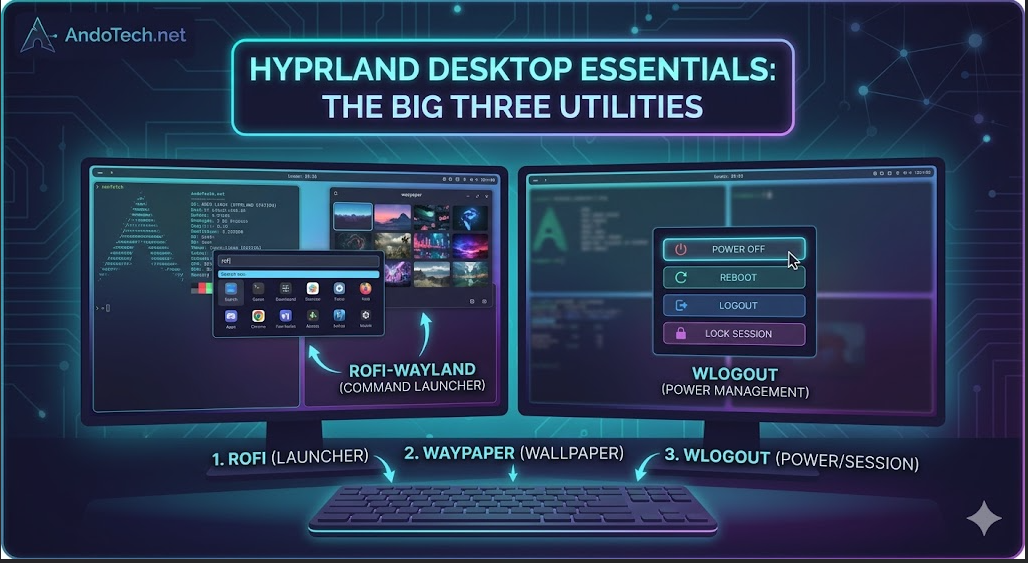
💡 Quick Take: 3 Hyprland Must-Haves
Booting into a dynamic tiling window manager like Hyprland leaves you with a blank canvas. To turn it into a luxurious, functional desktop workspace, these three standalone utilities are absolute essentials:
- 1. Rofi (Wayland Fork): The gold standard app launcher and command execution engine. Binds cleanly to your
SUPERkey for instant navigation. - 2. Waypaper: A highly responsive graphical frontend (GUI) that lets you visually browse and pick desktop backgrounds with a single click, bypassing tedious configuration files.
- 3. Wlogout: An elegant, scriptable full-screen overlay for session management (Lock, Logout, Reboot, Power Off) that eliminates typing exit commands in the terminal.
Introduction
Stepping out of a full, heavyweight desktop environment like KDE Plasma and into a dynamic tiling window manager like Hyprland is an incredible upgrade for performance and workflow efficiency. But when you boot into Hyprland for the very first time, you are greeted by an entirely blank canvas. There is no application menu, no wallpaper controller, and not even a power-off button.
Under a tiling layout, you build your own desktop piece by piece using independent, lightweight tools. While the ecosystem is packed with hundreds of utilities, three specific components stand out as absolute essentials. Together, they bridge the gap between a raw window manager and a luxurious, fully functional workspace. Here are the three “must-have” tools for your Hyprland configuration.
🚀 1. Rofi (Wayland Fork) — The Command & App Launcher
When you need to open an application, look up a file, or run a quick calculation, you need a lightning-fast launcher that stays hidden until the exact fraction of a second you press your keybinding. While legacy users rely on tools like Wofi, Rofi (specifically the native Wayland fork, rofi-wayland) is the absolute gold standard.
Why it’s a Must-Have:
Rofi isn’t just an application launcher; it is a completely scriptable interface engine. You can style it using .rasi configuration files to look like a clean, minimal search bar floating dead-center on your display. Beyond launching applications, you can feed scripts into Rofi to turn it into a clipboard history manager, a custom bit-rate audio selector, or a quick-access emoji picker.
The Quick Arch / CachyOS Installation:
Bash
sudo pacman -S rofi-wayland
The Hyprland Configuration Hook:
To bind Rofi to your Super key (the Windows key), drop this line cleanly into your hyprland.conf:
Plaintext
bind = SUPER, SPACE, exec, rofi -show drun
🖼️ 2. Waypaper — The Visual Wallpaper Controller
Hyprland uses background daemons like hyprpaper or swww to actually project image files onto your monitors. However, editing text files or running long terminal commands just to change your desktop wallpaper is incredibly tedious when you just want to browse through your media collection. Enter Waypaper.
Why it’s a Must-Have:
Waypaper acts as a beautiful, highly responsive graphical frontend (GUI) that sits on top of your wallpaper engines. It scans your dedicated wallpaper folder, presents them as a gorgeous grid of thumbnails, and lets you visually pick a new background with a single mouse click. It handles multi-monitor scaling layouts perfectly and runs completely quietly in the background without draining system resources.
The Quick Arch / CachyOS Installation:
Bash
yay -S waypaper
The Hyprland Configuration Hook:
To make sure your selected wallpaper restores perfectly the instant you boot up your computer, add the automatic recovery daemon to your autostart line inside hyprland.conf:
Plaintext
exec-once = waypaper --restore
🛑 3. Wlogout — Elegant Session & Power Management
When it is time to walk away from the computer, lock the session, reboot into your Windows dual-boot drive, or completely shut down the system, you shouldn’t have to type terminal exit commands. Wlogout provides an elegant, distraction-free visual menu for closing out your session.
Why it’s a Must-Have:
When triggered, Wlogout darkens or blurs your active workspaces and displays a stunning, full-screen overlay featuring clean, oversized buttons for Lock, Logout, Suspend, Reboot, and Power Off. It is completely customizable using standard CSS, meaning you can easily style the buttons to blend seamlessly into your dark theme or match your specific panel colors.
The Quick Arch / CachyOS Installation:
Bash
yay -S wlogout
The Hyprland Configuration Hook:
A great practice is to bind this to your Super + Escape key combination so you can safely shut down or lock your system in a single keystroke:
Plaintext
bind = SUPER, ESCAPE, exec, wlogout --protocol layer-shell
The Verdict
The true beauty of a layout like Hyprland is that you don’t have to settle for bloated, pre-packaged desktop choices. By pairing Rofi for command execution, Waypaper for quick asset adjustments, and Wlogout for secure power states, you get all the comfort and convenience of a premium desktop environment while keeping your system incredibly minimal, lightweight, and blazing fast.